Offline AI file search on Mac: search files without uploading them
Yes, you can search your files with AI without uploading them. The trick is a model that runs on your own Mac instead of on a server. Seek works this way: photo understanding, text recognition and search all happen on your Mac, your files are never sent anywhere, and after a one-time model download it works with Wi-Fi off.
Cloud AI search vs local AI search
“AI file search” can mean two very different setups.
- Cloud AI search. Your files, their text or their thumbnails are sent to a company's servers, where a model reads them. It can use very large models, but your files leave your Mac, you depend on the provider's rules for keeping them, and it needs an internet connection.
- Local, on-device AI search. The model is stored on your Mac and runs there. Your files stay put, it works offline, and nothing is shared. The trade-off: your Mac does the work, so the first pass over your files takes a while.
For personal files (bank statements, IDs, contracts, family photos), local is the safer default. You don't have to read a privacy policy to know where your files went.
What's already private on a Mac
Apple's built-in search is on-device too, and it's worth using:
- Spotlight builds its search index on your Mac.
- Photos analyzes your library on your Mac, so you can search it for things like “beach” or “dog”.
- Live Text reads text in an image you're looking at, in Quick Look or Preview.
Where they stop: Finder can't search image files in your folders by what they show, can't search all your screenshots by their text at once, and doesn't understand a sentence like “pdfs from last month over 5 mb”. That gap is what local AI file search apps fill. See finding photos by description and searching text in screenshots for the details.
What runs where in Seek
Seek is a Mac file manager that runs beside Finder. Here is every kind of “smart” work it does, and where it happens.
| Task | Runs on | Goes online? |
|---|---|---|
| Understanding plain English (“zips in Downloads older than a week”) | Seek's own rules, on your Mac | Never |
| Harder sentences, with Apple Intelligence (macOS 26 or later) | Apple's on-device model | No |
| Finding photos by what they show | Google's SigLIP model, converted for Apple's Core ML, on your Mac | Only the one-time model download |
| Reading text in images and scanned PDFs | Apple's text recognition (Vision), on your Mac | Never |
| Reading Word, Excel, PowerPoint, PDF and text files | On your Mac | Never |
| The search index | SQLite files in Seek's folder on your Mac | Never |
| Duplicate checks | Checksums computed on your Mac | Never |
The index lives in ~/Library/Application Support/Seek. Each photo is stored as a short list of numbers that describes what it shows, about 768 bytes per photo, not a copy of the photo. Text is stored so it can be searched, also on your Mac.
What Seek does go online for
Being honest about this matters more than a “100% offline” badge. Seek connects to the internet for exactly these things:
- The photo model, once. During setup Seek downloads its image model, about 375 MB, and checks it before installing. If you turn photo search off, the model is deleted.
- Website icons in Downloaded From. Seek asks each website for its icon, once. Only the site's address is sent, straight to that site. You can turn this off in Settings › Privacy.
- Your license. Seek checks your license key about once a day. Being offline never locks Seek.
- Updates. Seek checks for new versions. You can turn automatic checks off in Settings › General.
- Bug reports. Only when you choose to send one.
No file, file name or file content is ever sent. Seek collects no analytics.
How to set up offline AI file search on your Mac
- Install Seek and go through setup. It downloads the photo model while you read the setup pages.
- Let it read your files once. In the background, at low priority and newest first, Seek reads the text in your documents, PDFs and images, and looks at your photos. It covers the folders in your home folder, Pictures and iCloud Drive. It pauses when the battery is under 20% or the Mac is hot.
- Search. Press ⌘F and describe what you want.
Some searches to try:
- “dog on the beach”: photos matched by what they show.
- “text in screenshots tracking number”: screenshots matched by the words in them.
- “pdfs containing lease”: documents matched by the words inside.
- “photos from last month in Downloads”: plain filters, no AI needed.
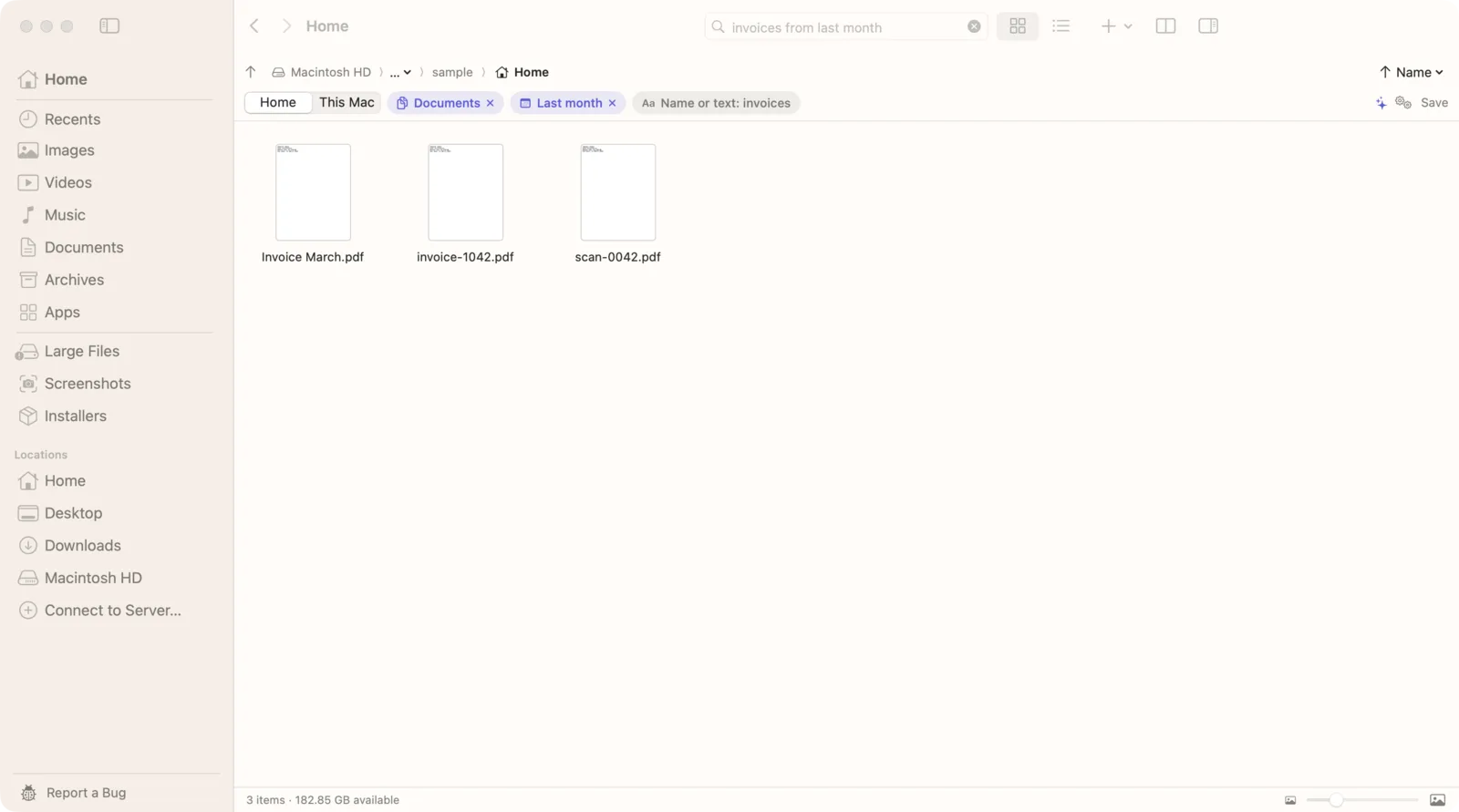
Check it yourself
You don't have to take our word for it.
- After setup, turn off Wi-Fi.
- Search for a photo by description and a screenshot by its text. Both still work.
- For a closer look, a network monitor app such as LuLu or Little Snitch shows every connection an app makes.
What to look for in a private AI search app
Whichever app you choose, these questions tell you whether “private” means private:
- Where does the model run? The answer should be “on your Mac”, for every feature, not just some.
- Does search work with Wi-Fi off? If it stops, something is being sent somewhere.
- Does it list every connection it makes? A clear list, like the one above, is a good sign.
- Can you delete the model and the index? You should be able to remove everything it stored.
- Does it need an account? An account links your searches to you. Seek uses a license key and no account.
The trade-offs of local AI search
- The first pass takes time. Your Mac reads every file once. After that, Seek only reads what's new or changed.
- It uses some disk space. The model is about 375 MB; the index is much smaller than your files.
- Smaller models than the cloud. On-device models are built to be fast on a laptop. For finding your own files, that's the job they're good at.
Questions
Does Seek upload my files to search them?
No. Seek reads your files, recognizes text and matches photos on your Mac. No file, file name or file content is ever sent anywhere.
Does AI file search work without an internet connection?
Yes. After Seek downloads its photo model once during setup, search, photo search and text recognition all work offline. A missed license check never locks Seek.
Does Seek use a cloud AI service?
No. Photo search uses Google's SigLIP model running on your Mac, text recognition uses Apple's on-device Vision, and on macOS 26 or later Seek can use Apple's on-device Apple Intelligence model to understand harder searches.
What does Seek connect to the internet for?
The one-time photo model download, website icons for Downloaded From (which you can turn off), a daily license check, update checks, and bug reports when you choose to send one.
Where is the search index stored?
In ~/Library/Application Support/Seek on your Mac. It holds the text Seek read and a small description of each photo, about 768 bytes per photo.

AI search that stays on your Mac.
Photos, screenshots and documents, searched on-device. One-time purchase, no subscription.