Everything for Mac? The best Everything search alternatives
There is no Everything for Mac. Everything, the instant file search tool from voidtools, only runs on Windows. The good news: the Mac has several Everything alternatives, and each one is good at a different kind of search. This guide compares them fairly so you can pick the Mac file search app that matches how you actually look for files.
Why there's no Everything search on Mac
Everything is fast because of how Windows stores files. On NTFS drives it reads the drive's own file table to build a list of every file and folder name, then keeps that list current as files change. Type a few letters and the matching names appear as you type.
Macs use a different file system (APFS), so that trick doesn't carry over, and voidtools has never made a Mac version. Mac apps that feel like Everything get there in other ways: by using Spotlight's index, by scanning the disk directly, or by keeping an index of their own.
One more thing worth knowing before you choose: Everything is mainly a name search. It's brilliant when you remember part of a file name. If you often don't remember the name, you need a tool that also searches what's inside files.
The Everything alternatives for Mac, compared
1. Spotlight and Finder search (built in)
Every Mac already has a search index. Press ⌘Space for Spotlight, or ⌘F in a Finder window. Spotlight indexes file names and, for many file types, the text inside them.
- Good at: opening an app or a recent document by name, and searching text inside common documents. Nothing to install.
- Weak at: it can miss files when the index is out of date or a folder is excluded, results are mixed with apps, settings and web suggestions, and narrowing down means building criteria by hand in Finder.
If Spotlight seems to miss files you know exist, see Finder search not finding files.
2. Find Any File
Find Any File searches the disk directly instead of asking Spotlight. That makes it the closest match to Everything's spirit for people who search by name.
- Good at: finding files by name, size and date anywhere, including places Spotlight skips, such as hidden and system folders and drives that aren't indexed.
- Weak at: it's a name and attribute search. It doesn't look at the words inside documents or at what's in a photo.
3. EasyFind
EasyFind, from DEVONtechnologies, is another search tool that works without Spotlight's index.
- Good at: searching names, and optionally file contents, in folders Spotlight doesn't cover, with options like wildcards and Boolean operators.
- Weak at: without an index, every search reads the disk again, so content searches over big folders take time.
4. HoudahSpot
HoudahSpot is a front end for Spotlight's index for people who want precise control.
- Good at: detailed searches with many criteria (kind, dates, author, size, text and more), saved templates, and result columns you can sort.
- Weak at: it relies on Spotlight, so files Spotlight hasn't indexed won't show up, and building searches takes some learning.
5. Alfred and Raycast
Alfred and Raycast are launchers. Both include a file search command you can open from any app with a shortcut.
- Good at: opening a file whose name you know in a couple of keystrokes, alongside everything else a launcher does.
- Weak at: file search is one feature among many, so there's little help when you don't know the name or need to filter by date, size or folder.
6. Seek
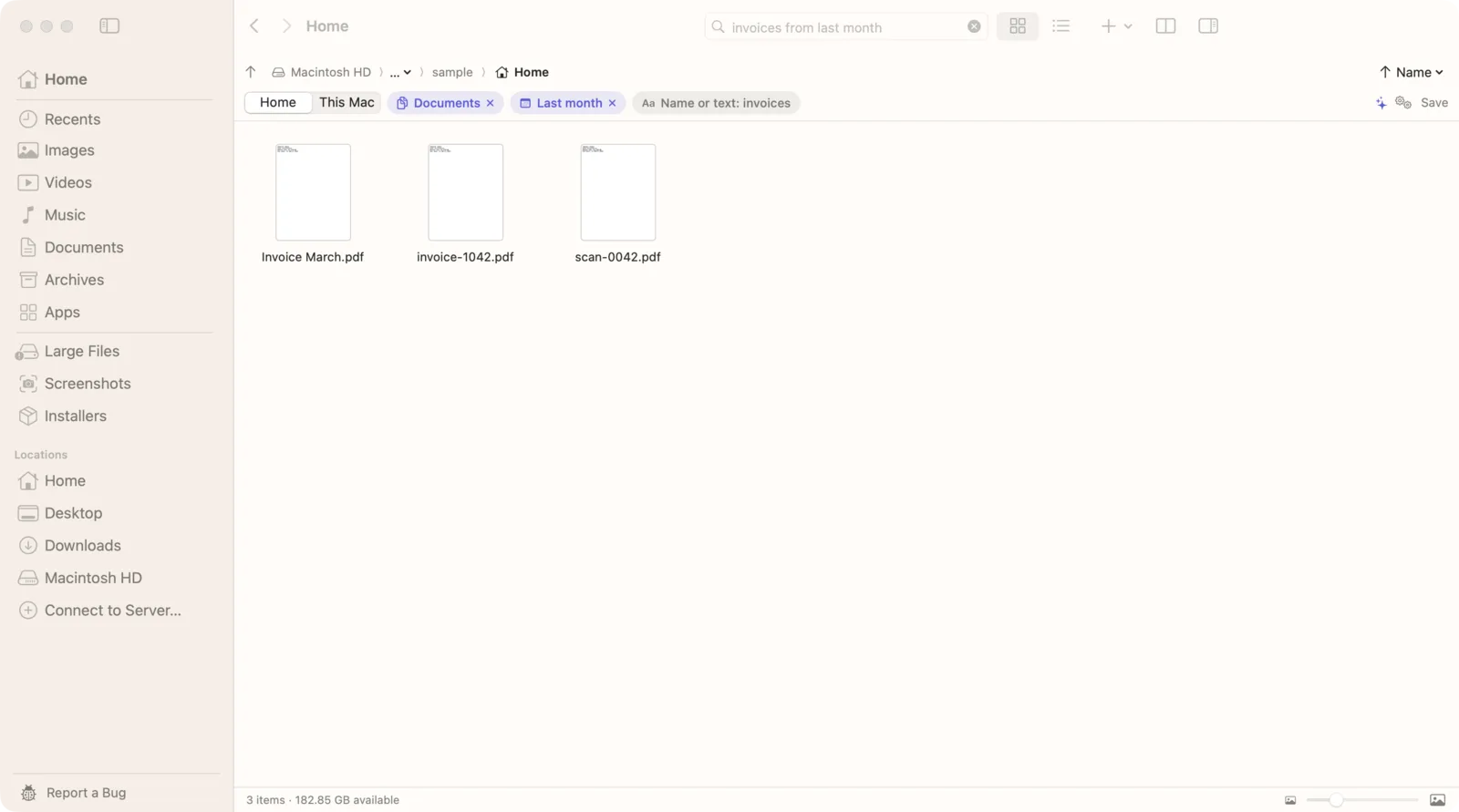
Seek is a Mac file manager that runs beside Finder, built around search. You describe the file in plain English and Seek searches names, the words inside files, and photos by what they show, all on your Mac.
- Good at: finding files when you only half remember them: “pdfs in Downloads from this month”, “monthly rent in October”, “mountains from last month”. Exact name matches always come first, so it still works as a name search.
- Weak at: it isn't a raw disk scanner for system files, it doesn't search inside videos, and it doesn't connect to remote servers.
Everything alternatives at a glance
| What you need | Spotlight | Find Any File | HoudahSpot | Seek |
|---|---|---|---|---|
| Find by file name | ✓ | ✓ | ✓ | ✓ |
| Search words inside documents | ✓ | — | ✓ | ✓ |
| Works where Spotlight doesn't index | — | ✓ | — | In the folders you search |
| Search in plain English | Partly | — | — | ✓ |
| Find photos by what's in them | — | — | — | ✓ |
| Read text in screenshots and scans | Partly | — | Through Spotlight | ✓ |
Seek reads text in screenshots and scanned PDFs with Apple's on-device text recognition, in the folders of your home folder and iCloud Drive. “Partly” for Spotlight means it can find some of this, but you can't ask for it directly.
How to search files on Mac like Everything, with Seek
- Open the search field with ⌘F, or press ⌃⇧Space from any app to open Seek's quick search panel, much like Everything's search window.
- Type part of the name. Exact name matches come first, then names that contain your words, then files with your words inside them, then photos that match the description.
- Or describe the file. Add what you know: the type, roughly when, the folder or where it came from. “zips in Downloads older than a week” becomes three filters.
- Pick where to search. The switch under the search field limits it to the current folder, Home or This Mac.
- Open it. In the quick search panel, ↩ opens the file, ⌘↩ shows it in Seek and ⌥↩ shows it in Finder.
A few searches that work in Seek, from our demo files:
- “tracking number from DHL” finds a screenshot by the words in it.
- “monthly rent in October” finds a spreadsheet and a scanned PDF that mention it.
- “woman walking on the beach in 2025” finds a photo by what's in it, plus the year.
More on this in how to find a file when you don't remember its name.
How Seek finds files
Seek runs several searches at once and merges them:
- Spotlight's index, for names, text, dates, sizes and kinds, when the Mac has one.
- Its own text index of documents, PDFs and images it has read in the background, including text recognized in screenshots and scans.
- A live scan of the folders you're searching, which checks names and filters and reads the text of documents that aren't indexed yet. So it still finds files in folders Spotlight skips.
- Photo search, an image model that runs on your Mac, for searches that describe a picture.
Nothing is uploaded. The photo model downloads once during setup (about 375 MB) and then works offline.
Which Mac file search app should you choose?
- You only ever search by name and want to reach every corner of the disk: Find Any File is the closest thing to Everything.
- You want free and good enough: start with Spotlight, and try EasyFind for folders Spotlight skips.
- You build precise searches with many criteria: HoudahSpot.
- You mainly want to open things fast: the file search in Alfred or Raycast.
- You often don't remember the name, search screenshots, PDFs and photos, and want to type what you remember: Seek.
These tools don't exclude each other. Plenty of people keep a launcher for opening apps and use a search app for finding files.
Questions
Is there an Everything for Mac?
No. Everything by voidtools is Windows-only and there is no official Mac version. On a Mac you can use Spotlight, or apps such as Find Any File, EasyFind, HoudahSpot or Seek.
What is the closest Everything alternative for Mac?
For searching by file name across the whole disk, Find Any File is the closest. If you also want to search the words inside files and photos by what they show, Seek puts name matches first and adds content and photo search.
Does Seek need Spotlight?
No. Seek uses Spotlight's index when it's there, but it also scans the folders you search and keeps its own index of text it has read, so it still finds files in folders Spotlight doesn't index.
Can Seek search inside files like Everything's content search?
Yes. Seek searches the words inside PDFs, Word, Excel, PowerPoint, text and code files, and with on-device text recognition, inside screenshots and scanned PDFs.
Does Seek upload my files?
No. Search, text reading and photo matching all run on your Mac, and no file, file name or file content leaves it.

Search like Everything, and then some.
Names first, plus the words inside files and photos by what's in them. One-time purchase, no subscription.