How to search Mac files without relying on Spotlight
Almost every way to search a Mac, from the search field in Finder to ⌘Space, goes through Spotlight. When Spotlight is broken, still indexing, or told to skip a folder, they all come up empty at once. A Mac file search without Spotlight works differently: it looks through the folders itself, or keeps its own index. Here are your options, from tools already on your Mac to apps.
When Spotlight lets you down
- The index is damaged, often after an update or a move to a new Mac. Files go missing from results, or old ones keep appearing.
- Spotlight is still indexing a new Mac or a big drive, so results are incomplete.
- A folder or drive is on the Spotlight Privacy list, so nothing inside it is indexed.
- The drive isn't indexed at all, which is common with external and network drives.
- You turned indexing off on purpose.
Fixing the index is often the right first step, and our Finder search checklist walks through it. But a rebuild can take a long time, and some folders will never be indexed. When you need the file now, you need search that doesn't rely on Spotlight.
First, check whether Spotlight is the problem
Before you change tools, it helps to know if Spotlight really is at fault. Terminal has a Spotlight search of its own, mdfind, and the plain folder walk, find. Run both for the same name:
mdfind -name "invoice"asks Spotlight's index for files with “invoice” in the name.find ~ -iname "*invoice*"walks your home folder and checks every name. It takes longer.
If find lists the file and mdfind doesn't, the file exists but isn't in the index. That's a Spotlight problem: fix the index, or use one of the options below. If neither finds it, the file may have a different name than you think, or it isn't on this Mac.
Option 1: Terminal's find command
Every Mac has find, a command that walks through folders and checks every file name. It doesn't use Spotlight at all. Open Terminal (in Applications › Utilities) and try:
find ~/Documents -iname "*invoice*"lists every file in Documents with “invoice” in its name, upper or lower case.find "/Volumes/My Drive" -iname "*.pdf"lists every PDF on a drive called My Drive. Put paths with spaces in quotes.grep -ril "rent" ~/Documentslists files in Documents that contain the word “rent”.
The limits: grep reads plain text, so it can't see the words in PDFs, Word files or screenshots. Both commands read every folder every time, so a big drive takes a while. You need to know a piece of the exact name, and there are no previews.
Option 2: Apps that skip Spotlight's index
Some Mac apps search the disk directly instead of asking Spotlight:
- Find Any File searches file names straight from the disk, including places Spotlight leaves out, and is a favorite for finding hidden and system files.
- EasyFind, from DEVONtechnologies, searches names and contents without an index.
- HoudahSpot works the other way: it builds on Spotlight's index and adds precise criteria and saved searches. It's great when Spotlight works, and suffers when it doesn't.
They're solid tools, built around names, exact words and criteria you set up.
Option 3: Seek, which uses Spotlight but doesn't rely on it
Seek is a Mac file manager that runs beside Finder. To be clear about how it works: it does ask Spotlight when Spotlight has an index, because that's fast. But when you search a folder or your Home folder, three more searches run at the same time:
- A folder walk. Seek goes through the folders you're searching and checks each file's name and details (type, date, size, where it was downloaded from) itself. A file Spotlight never indexed still turns up.
- Its own text index. In the background, Seek reads the text inside your documents, PDFs and images, with text recognition for screenshots and scanned pages. It covers the folders in your home folder and iCloud Drive, and the index stays on your Mac.
- Text read on the fly. For documents it hasn't read yet, the walk opens them and checks the words inside as it goes. This covers PDFs with a text layer, Word, Excel, PowerPoint, text files and more. Images and scans need the background index.
So a Mac file search without Spotlight still finds files by name, by filters and by the text inside documents. When Spotlight works too, you get both. Photo search, which finds pictures by what they show, uses Seek's own index as well.
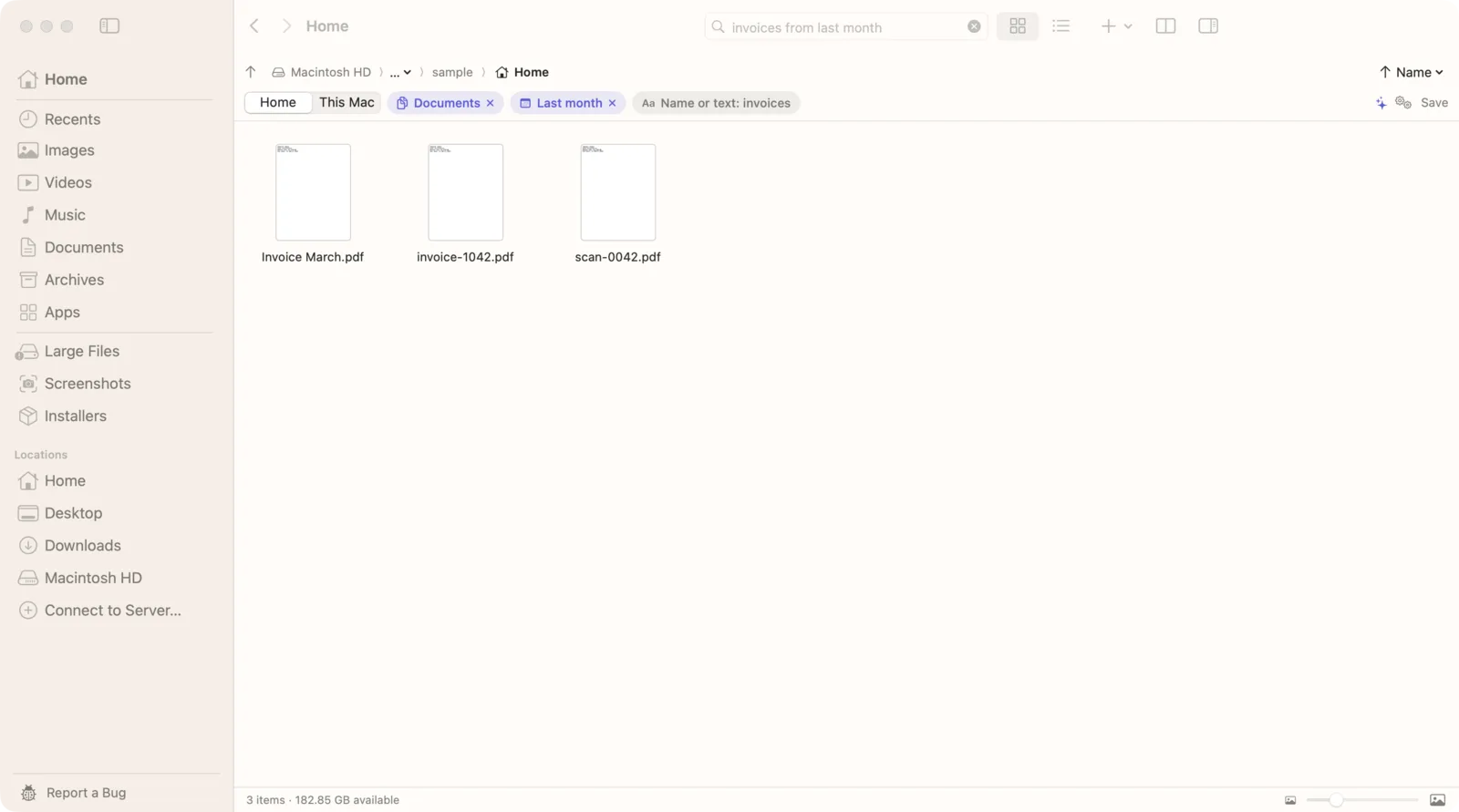
Pick the right scope
Under the search field, Seek has a switch: the current folder, Home, or This Mac. The current folder and Home use all four searches above. This Mac asks Spotlight only, because walking an entire disk on every search would be slow. So when Spotlight is broken, search Home, or open the folder you think the file is in.
Searches to try
- “invoice” in Documents: files named invoice first, then files that contain the word.
- “pdfs containing lease from 2025”: PDFs from 2025 with “lease” inside.
- “contract on external drive”: walks every connected external drive, indexed or not.
- “screenshots containing wifi password”: screenshots whose text Seek has read.
Spotlight alternatives on Mac, compared
| Feature | Finder search | Terminal find | Seek |
|---|---|---|---|
| File names, when Spotlight is broken | — | ✓ | ✓ |
| Words inside PDFs and Word files | Only if indexed | — | ✓ |
| Dates, types and sizes | ✓ | With extra options | ✓ |
| Previews | ✓ | — | ✓ |
| Photos by what's in them | — | — | ✓ |
If all you need is a file name, find or Find Any File will do. If you also need the words inside documents, dates in plain English, or photos by what they show, Seek covers those. For a wider comparison of search apps, see Everything for Mac.
Questions
Can you search a Mac without Spotlight?
Yes. Terminal's find command and apps like Find Any File and EasyFind search the disk directly. Seek uses Spotlight when it's available, and also walks folders and keeps its own text index, so it still finds files when Spotlight can't.
Does Finder search work with Spotlight turned off?
Not really. Finder's search field relies on Spotlight's index, so on a disk or folder that isn't indexed it finds little or nothing.
Does Seek work if Spotlight is turned off?
Yes, when you search a folder or your Home folder. Seek checks names directly and uses its own index of the text inside your files. The This Mac option relies on Spotlight, so use Home instead.
Where does Seek keep its index?
In its data folder on your Mac. It reads your files on your Mac and never uploads them, their names or their contents.

Search that keeps going when Spotlight doesn't.
Names, filters and the words inside your documents, all on your Mac. One-time purchase, no subscription.